Showing posts with label Unity. Show all posts

Tuesday, 26 April 2016

Enemy with A.I.


Enemy interactions are an important part of any platformer game. They can provide a great representation of the environment and world, simply by their design and actions. However, even if you are set in one location, enemy variation is required or the experience can come off as being boring or poorly planned out. While varying designs can be one solution, enemy behaviour can be just, if not more, effective. In the case of the enemy "Isley" (Named on my end as a tribute to the Batman villainess 'Poison Ivy', real name 'Pamela Isley'), an A.I. function was added to allow "Isley" to shoot projectiles at Nimbus when she enters a predetermined trigger point in relation to "Isley". Acting as a stationary but sentry character, similarly to the ParanĂ¡ Plants from Super Mario Bros.

- Nintendo. [1985]. Super Mario Bros. [Cartridge] Nintendo Entertainment System. Kyoto: Nintendo Co., Ltd.

Tuesday, 5 April 2016

Tutor Feedback and Notes - 4/4/16

Tutorial Feedback from Doros, on the first Demo:
  1. Start page – too dark / black text on dark bg –text is unreadable.
  2.  Camera – too far out – needs to be zoomed in more. Needs to be decided before you design/fine tune your level
  3. Character animation – Needs more frames / more fluent change between idle / walk / jump
  4. Tree animations – interesting effect but maybe it have been better if the tree trunks don’t move and only the upper part of the trees/leaves?
  5. Level navigation/jumping. Controls are not accurate enough for this type of level design. The character jumps way to far and the blocks are too small making the level frustratingly difficult to navigate (Maybe its me, but I did not manage to climb the tree – and I did try more than 20 times!) 
  6. Character clings on platforms on the way down.
  7. I want to see an example of the dialogue and how it will be implemented.
  8. Examples of enemies / fight mechanics? How are the enemies going to be moving around the space? Will each type of enemy have a unique moveset?
Notes:
  1.  Start Page was an after thought to inform that the art assets were temporary and that all placements were subject to some change.
  2. Agreed, The Camera is too far out. This shall be rectified first.
  3. Temporary Sprite, All finished sprites are still being drawn.
  4. Tree Trunks move by mistake, Product of the sprite being cut afew pixels short. Shall be rectified imediatly.
  5. Jump needs to be fine tuned. Will also experiment with stone placement to try and find the best layout.
  6. Hadn't thought of that.
  7. Dialogue is currently being written, I should recieve it later today. Ready for implementation.
  8. Yes, Each type of enemy will have its own style of movement. Mock sprites are being created.

Wednesday, 30 March 2016

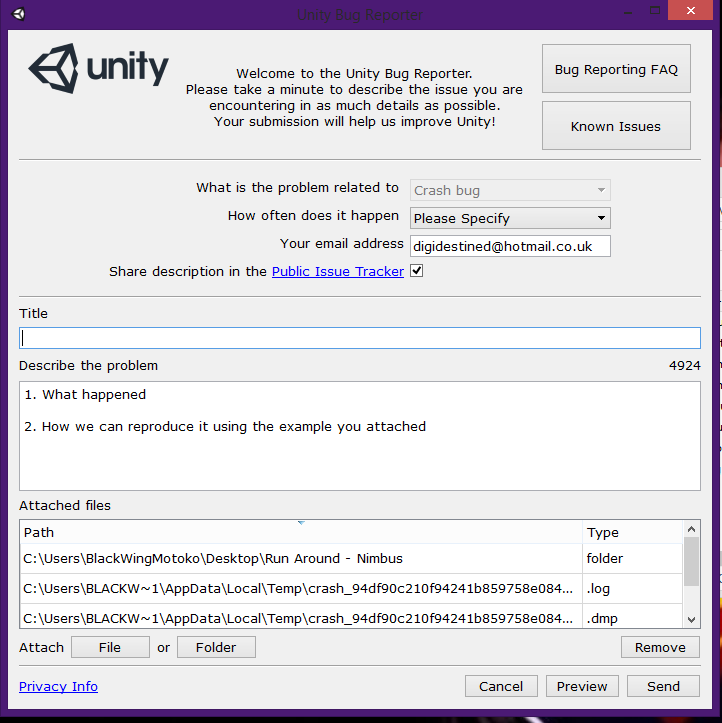
Technical Difficulties - Unity Crashes

Save Every Few Minutes.

As the initial Build came to an end, Unity decided to crash. This would not have been too much of a problem, except no saved copy had been made in over an hour, and the crash happened mid-save. After rebuilding for the next hour and a half (saving every 5 minutes), an attempt was made to export a version of the file. To my dismay, Unity crashed again.

Several hours, and two computers later, it was discovered that a flaw in the previous update had prevented the file from exporting. The initial crash was most likely due to stress on the machine, as it was later followed by the dreaded "Blue Screen of Death".

 Correspondence to Doros (30/03/2016):
ML: "I have been attempting to send you the Demo build that we agreed upon all day, but for some unknown reason Unity keeps crashing as I am exporting the file. I will carry on with the export attempts but I am sending you this to confirm that the demo of level one has been built as requested. Unity has been crashing on both of my systems for the past two days, so I am unsure of what the problem is, but you shall recieve the demo as soon as it has been exported."

Correspondence to Doros (31/03/2016):
ML: "Apologies for this being a day later than agreed, It took till 1:40 this afternoon for all software problems to be fixed (apparently it was to do with the previous update not installing correctly on either system). Please a link to the first level demo, formatted as a web file for ease of access."

Tuesday, 29 March 2016

Contruction Begins - Unity Building

With mock sprites created for a number of background and interactive elements, construction begins on the first level. Using Nikki's original sketch and description as a starting point, assets were placed in a manor to test weather the layout worked well. While the visual asthetic seems appealing, the placement of stepping stones and rocks proved that the characters jump height and hit detection need to be recalibrated, and the placement tweaked. The current build, while labelled Level 1, is approximatly half of the level. No enemies have been introduced yet, and character interaction still needs to be implemented. The level, however, serves it's purpose of exploring what needs changing before final assets are created.

Sunday, 27 March 2016

Fleshing out the Opening Level - Correspondence


While developing the opening level, discussions continued as to what else needed to be in the introduction, if the level should be longer, and subtle design decisions.

NA: "I was thinking the two levels will be like the green forest kind of thing at the beginning and showing the pollution, the second level being a darker more magical forest, kind of what I drew for the concept art but then having wires and cables taking over the trees. Kind of a 'Tron' vs. nature thing."


ML: "Nice. I've been experimenting with the mock up sprites to show a difference between the healthy trees and the polluted. Jumping straight from lush green trees to twigs seemed a bit preposterous in hindsight, so I have redrawn some of the assets with a duller pallet. Replacing the brown of the bark with a sickly gray, and the green leaves with a burnt orange/brown. May have to tweak the gray bark though once the wires and cables are introduced then so they don't clash."


NA: "Awesome. I was thinking at the end of one of the levels we climb a waterfall and at the top is a small conversation."

Saturday, 26 March 2016

Bringing Life to the Enviroment - Mock Sprite Decisions

The idea of using a forest setting brings with it some peculiar hang ups. A forest is never still. Despite using mock sprites and nothing being finalised yet, the use of static images to represent a forest full of life negates the point. This brings the question, how do you show movement of the trees, without sacrificing time? The answer arose while experimenting with the leaves on a mock sprite. By redrawing just the leaves with only minor differences, the allusion is given that they are in fact moving. The initial experiment and mock sprite uses only two frames as a proof of concept, though final sprites should utilise three or four for a greater emphesis of movement.

Friday, 25 March 2016

"The Big Tree" - Design Decision and Mythology

During Nikki's earlier design for the first level, the idea of a big tree was brought up. The concept of using an enlarged Ash Tree, originally seemed to be a bit of a stretch. However, upon further research, it was discovered that Yggdrasil (pronounced "IG-druh-sill) , The Tree of Life in Norse Mythology, is described as an "an eternal Ash tree". Leading to the Ash tree motif continuing through out the level.

The inclusion of Yggdrasil, depending on weather or not we choose to play on the mythological angle, provides a wealth of possible influences and sources of inspiration in regards to world building and character design. With stories such as the "Nine Realms", "Ratatosk" and "Sleipnir".


http://norse-mythology.org/cosmology/yggdrasil-and-the-well-of-urd/
http://www.viking-mythology.com/animals.php#ratatosk
http://www.viking-mythology.com/img/Yggdrasil_The_Tree_of_Life_Ratatosk_Nidhug.jpg

Thursday, 24 March 2016

Mock Design Assets - British Ash Trees

When discussing the setting and story of Nimbus during our last tutorial session (23rd March 16), Ivan brought up the topic of endangered trees. Stating that the British Ash Tree was currently endangered due to fungal Infection and insects [http://www.independent.co.uk/environment/nature/britains-ash-trees-could-be-wiped-out-by-fungal-infection-and-borer-beetle-a6951246.html]. With this thought firmly in mind, we began to rethink certain design aspects of the game with the British Ash Tree.

With an over arching theme of technology and
pollution destroying the forrest, the idea of using somewhat endangered tree's became a linchpin in using design to tell a story. Basic mock assets were redrawn to resemble that of Ash trees in various stages of decay. This works as a way to re-inforce the enviromental themes of the game, as it somewhat reflects the state of out current enviroment. Providing more depth to the plot.


https://i.ytimg.com/vi/lacWSKjLdSI/maxresdefault.jpg

Wednesday, 23 March 2016

Plotting the first level - Correspondence

With Nikki in charge of the games design aspects and level layout, the first level became a defining moment in deciding how the rest of the game would run, build wise. It was decided that Nikki would provide a basic sketch of what she had in mind with a brief description of anything she felt was unclear, and I would provide my feedback as to what was do able, and any ideas I would have stemming from the outline.


Correspondence:

NA: "so the first bit is like what you showed me earlier, going into a section of a large crater where you walk along the wall which is like the stepping stone earlier, some of them will fall like in the demos we have done."
NA:  "With the tree it climbs up in a zig zag like pattern until she enters the top of the screen and climbs over the branches, in between the leaves and all that"

ML: "Ok"

NA: "I was thinking either that section ends with us forcing nimbus to jump from the tree luckily lands into a section of water, so the last third of the first map is more watery like there is a river going along the floor, leading up to a waterfall which we climb to end the level"

Saturday, 27 February 2016

Changing scenes, only a button press away!


While using the free version of Unity is still incredibly versatile, it does have its limitations. Namely  a lack of implementation for cut scenes. While not a necessity in a story driven game, they have become expected, and can provide information and character development in a far more direct manner than mechanics can at times.

Through experimentation, a simple solution was achieved in the manner of single scene shots, with character idle animation in place of full animated cut scenes. 

By adding a new GameObject to the scene and attaching a C# code. Within the code us an update function that runs 'Application.LoadLevel' when 'KeyCode.Space' is inputed. Allowing for the scene to change every time the space bar is pressed.